

WorshipScreen Church Presentation Software: A Practical Guide for Worship Services
A well-organized church service often depends on more than the people standing on the platform. The visual presentation also plays an important role. Worship lyrics help the congregation participate in songs, Bible verses make Scripture easier to follow, announcements communicate important information, and videos or images can support a sermon or church event.
Managing all of this content manually can quickly become complicated. A volunteer may need to open several programs, search through folders, switch between files, and constantly check whether the correct material is being displayed. A dedicated church presentation platform can make the process much easier.
WorshipScreen is a browser-based solution created for this purpose. It provides a single environment for preparing and displaying worship songs, Bible passages, sermon content, images, videos, announcements, and countdowns. Because the platform is free to use, it can be an accessible option for churches that want a practical presentation system without the cost and complexity of traditional professional software.
What Can WorshipScreen Do?
The main purpose of WorshipScreen is to help a church organize the visual side of a service.
The platform can be used for several common tasks:
displaying worship song lyrics;
presenting Bible verses;
preparing sermon Scripture;
showing announcements;
displaying photographs and other images;
playing videos;
creating countdowns;
using visual backgrounds;
organizing content into service playlists.
These functions can be combined according to the needs of a particular congregation.
A Sunday service may require only songs and Scripture, while a larger service may include videos, event announcements, photographs, and a countdown. Instead of creating separate systems for every type of content, the church can organize these elements through one presentation workflow.
Why Use Browser-Based Church Software?
Traditional presentation software is often installed on one specific computer. This can work well, but it may create difficulties when different volunteers are responsible for church services.
A browser-based system offers a more flexible approach. WorshipScreen can be accessed through a web browser, making it easier for a church team to work with the platform without installing a large application.
This can also simplify the onboarding of new volunteers. Someone who has never operated professional presentation software can learn the basic workflow: select the service playlist, display the required content, and move through the presentation as the service progresses.
The exact technical setup will depend on the church's equipment, but the basic concept remains simple: prepare the content, connect the presentation device to the church display, and operate the service from the browser.
Free Worship Software for Churches
Budget is an important consideration for many churches, especially smaller congregations and organizations that depend heavily on volunteers.
Free worship software can provide an alternative to expensive presentation platforms when the main goal is to display lyrics, Scripture, announcements, and multimedia content.
WorshipScreen is designed to cover these practical requirements without requiring a church to purchase a traditional professional presentation package.
This makes it possible to start with the essentials. A church can first use the platform for worship lyrics and Bible verses, then gradually introduce additional functions such as videos, images, timers, and more structured playlists.
The result is a presentation workflow that can grow alongside the church's needs.
Setting Up the Church Display
Before preparing content, the church should decide how the presentation will be shown to the congregation.
One common configuration is a computer connected to a projector or large television. An HDMI connection can be used where supported. The computer runs the presentation, while the projector or display shows the content to the congregation.
Using an extended desktop can make the setup more convenient. The operator sees the controls on the computer while the audience sees only the presentation output.
This separation is useful because the operator may need to prepare the next item, check the playlist, or make a change without showing those actions on the main screen.
A church should test the entire connection before every important service, particularly if different volunteers use different computers.
Building a Library of Worship Songs
One of the most time-consuming tasks in weekly church presentation preparation can be entering lyrics repeatedly.
A reusable song library solves much of this problem.
When a song is added to WorshipScreen, it can be saved and used again in future services. If the congregation sings the same songs regularly, the media team does not have to recreate their slides every time.
The lyrics should be checked carefully after they are entered. The version used by the church should match the version performed by the worship team.
This is particularly important when a song contains multiple verses, repeated choruses, a bridge, or an arrangement that differs from the original recording.
Formatting also matters. A screen filled with long paragraphs can be difficult to read. Shorter sections, appropriate font sizes, and clear line breaks generally make lyrics easier for the congregation to follow.
Creating a Presentation for Sunday Worship
Once the song library is ready, the next step is to create the presentation for a specific service.
The service playlist can be organized according to the planned order. For example, it might begin with a countdown, followed by a welcome slide and several worship songs. After worship, the presentation might move to announcements, a Bible reading, a sermon, and closing information.
The exact order depends on the church.
The important point is that the operator should not have to search for every item during the service. Preparing the playlist beforehand creates a clear sequence and reduces the possibility of accidentally displaying the wrong file.
A playlist can also be modified when necessary. If the worship leader changes the order of songs or a pastor adds another Scripture reference, the operator can adjust the presentation rather than starting over.
Bible Verses for Sermons and Worship
Displaying Scripture is one of the most common reasons churches use presentation software.
A pastor may refer to several passages during one sermon. If these references are prepared before the service, the presentation operator can display them as they are mentioned.
This can be especially useful when the congregation is encouraged to follow a particular passage together. Instead of everyone trying to find the reference independently, the text can be displayed clearly on the main screen.
Bible verses can also be incorporated into worship, prayer, introductions, and transitions between sections of a service.
The presentation team should confirm the Bible translation required by the church and make sure the displayed text is accurate before the service begins.
Adding Announcements to the Service
Church announcements are another area where a presentation platform can save time.
Instead of printing every announcement or relying only on verbal communication, a church can display important information on screen. This may include upcoming events, Bible studies, community activities, meetings, registration information, or reminders.
Announcements can be prepared as individual slides and added to the service playlist.
A visual announcement should remain simple. The audience needs to understand the essential information quickly, so excessive text can reduce its effectiveness.
Using consistent backgrounds, fonts, and layouts can also make announcements look like part of the same church presentation rather than unrelated slides.
Working With Images and Videos
Multimedia has become a normal part of many church services.
A congregation might watch a short video before a sermon, see photographs from a recent mission project, or view a promotional video for an upcoming event.
WorshipScreen allows images and videos to be incorporated into the presentation workflow. This means the operator does not necessarily have to leave the main presentation environment every time a video needs to be played.
Before the service, every video should be tested. Internet-dependent content should be checked in the actual environment where it will be used. If sound is required, the audio connection should also be tested.
Images should be prepared at an appropriate resolution for the display. Very small images may look poor when enlarged on a projector or large screen.
Choosing the Right Background
The background is an important part of the visual presentation, but it should not overpower the information.
WorshipScreen can use images and videos as backgrounds. Churches can select visuals that match their atmosphere, branding, or the theme of a particular service.
For worship lyrics and Bible passages, readability should always come first.
A background with strong visual detail behind white text can make the words difficult to see. A calmer image or darker overlay may provide better contrast, depending on the design.
It is also useful to maintain consistency. If every slide uses a completely different visual style, the presentation can appear disorganized. A small collection of carefully selected backgrounds is often enough for regular services.
Countdown Before Worship Begins
Many churches use a countdown before the service starts.
A countdown can let people know that the service will begin soon while creating a clear transition from informal conversation to worship.
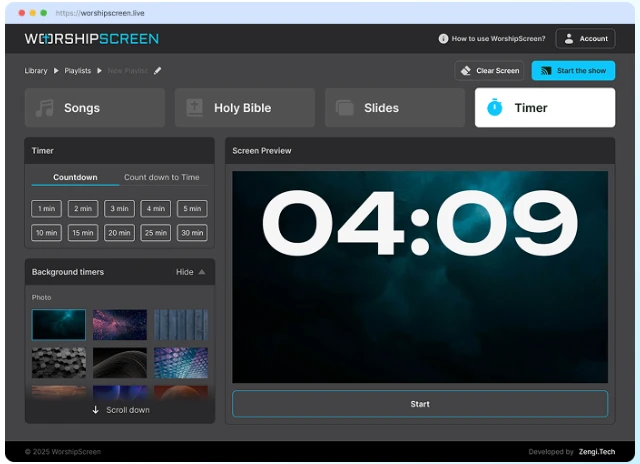
WorshipScreen can be used to display a countdown with a selected background. The timer may count down from a chosen duration or toward a specific start time.
This is a simple feature, but it can become a useful part of a church's regular presentation routine.
For example, the media volunteer can start a five-minute countdown shortly before the scheduled beginning of the service. When the timer reaches zero, the operator can move directly to the welcome slide or first worship song.
Supporting Bilingual Congregations
Churches serving multilingual communities may need to present songs and Scripture in two languages.
A bilingual presentation requires more attention to formatting because the same screen needs to remain readable for different groups of people.
WorshipScreen can be used to display two-language lyrics and Bible passages. The media team can prepare the material in advance and decide how the languages should be arranged.
Font size, line spacing, and contrast should be tested on the actual church display. If too much information is placed on one screen, both languages may become difficult to read.
A well-designed bilingual presentation should make participation easier rather than simply putting two blocks of text on the screen.
Using WorshipScreen for Methodist Worship
Churches from different traditions may have different service structures, but many of their presentation requirements are similar.
A Methodist congregation, for example, may use hymns or contemporary worship songs, Scripture readings, prayers, sermon passages, announcements, and multimedia content during its services.
For churches searching for methodist worship software, WorshipScreen provides a flexible presentation environment that can be adapted to these requirements. The software does not require a particular service format. The church can create playlists according to its own order of worship.
The same presentation approach can also be used for special services, Bible studies, youth meetings, prayer gatherings, Christmas programs, Easter services, and community events.
Preparing the Service Before Sunday
Preparation is the foundation of a smooth presentation.
The media operator should receive the final worship set list, sermon Scripture references, announcements, and multimedia materials early enough to review everything.
The next step is to build the playlist.
Add the worship songs in the correct order, insert Bible passages, place announcements where they belong, and add any videos or images required during the service.
Then review the complete presentation.
Check spelling and lyrics. Confirm Bible references. Test videos. Make sure backgrounds do not interfere with text. Verify that the display connection works and that the audience screen shows the intended output.
It is also useful to practice the first few transitions. The beginning of the service is often the moment when the operator has the least room for mistakes because people are entering, the countdown is ending, and the worship team is preparing to start.
Operating the Presentation During the Service
During a live service, the operator's attention should remain on what is happening on stage.
The presentation should follow the worship leader rather than moving automatically at a fixed pace. If a chorus is repeated, the operator should be ready to display it again. If the pastor moves to another Bible passage, the corresponding content should be available.
This is why the playlist should be considered a prepared framework rather than an inflexible script.
WorshipScreen combines preparation with live control, allowing the operator to work from an organized set of materials while still responding to changes.
Handling Last-Minute Changes
Unexpected changes are normal in live events.
A song may be removed from the service, an announcement may be added, or a pastor may decide to include another Scripture passage.
The advantage of having a browser-based presentation workspace is that the operator can make adjustments without rebuilding the entire presentation.
If the church regularly experiences last-minute changes, the media team should also keep frequently used songs and Bible passages organized in the library. This makes it easier to find something quickly when it is needed.
A Simple Workflow for Volunteers
A church does not need a large technical team to establish an effective presentation process.
A simple weekly workflow can be enough:
1. Collect the content.
Get the worship set list, Scripture references, announcements, images, and videos.
2. Prepare the playlist.
Arrange everything according to the expected service order.
3. Review the slides.
Check lyrics, Scripture, spelling, backgrounds, and formatting.
4. Test the equipment.
Connect the presentation computer to the church display and test videos and sound.
5. Run the service.
Follow the worship leader and pastor and make adjustments when necessary.
6. Save useful materials.
Keep songs and reusable content in the library for future services.
This process can gradually become a standard part of weekly church preparation.
Conclusion
WorshipScreen is a practical church presentation platform for congregations that need to manage worship songs, Bible verses, sermons, announcements, images, videos, and other visual content.
Its browser-based approach keeps the workflow accessible, while the free model makes it possible for churches to use presentation software without adding another significant expense. The ability to create reusable song libraries and service playlists can also reduce repetitive preparation.
The most effective way to use WorshipScreen is to combine careful preparation with flexible live operation. Prepare the service in advance, check every item on the actual display, and keep frequently used materials organized. During worship, follow what is happening rather than simply clicking through a fixed sequence.
With this approach, the presentation becomes a quiet support for the service instead of a technical distraction. WorshipScreen gives churches a practical way to organize the visual side of worship while keeping the process straightforward for pastors, worship teams, and volunteers.